> For the complete documentation index, see [llms.txt](https://dyorhq.gitbook.io/docs/llms.txt). Markdown versions of documentation pages are available by appending `.md` to page URLs; this page is available as [Markdown](https://dyorhq.gitbook.io/docs/getting-started/fund-your-wallet.md).
# Fund Your Wallet
DyorHQ runs on **Monad mainnet**. To do anything beyond watching, your wallet needs a little MON and whatever asset you want to trade with.
## What you need
| Asset | Used for | Notes |
| -------- | ----------------------------------------------- | --------------------------------------------------------------------------------------------------------------------------------------------------------------------------------------------- |
| **MON** | Gas on every transaction | Keep some at all times. When you swap 100% of your MON, DyorHQ automatically keeps back enough MON to pay that swap's network fee, read live at the time (0.06 MON if the fee can't be read). |
| **USDC** | Swaps, collecting Moments, Launchpad pair asset | Moments are priced and settled in USDC only. |
| **AUSD** | Perps collateral, Launchpad pair asset | Perpl's collateral. First deposit is at least 10 AUSD. If you hold MON but no AUSD, the Transfer sheet can swap MON → AUSD for you on the way in. |
| **aBIL** | Launchpad pair asset (tokenized T-bill stock) | Coins paired with aBIL graduate on Monday Trade. |
Other Monad tokens work for swapping, except coins from past Moments cohorts.
## Your receive address
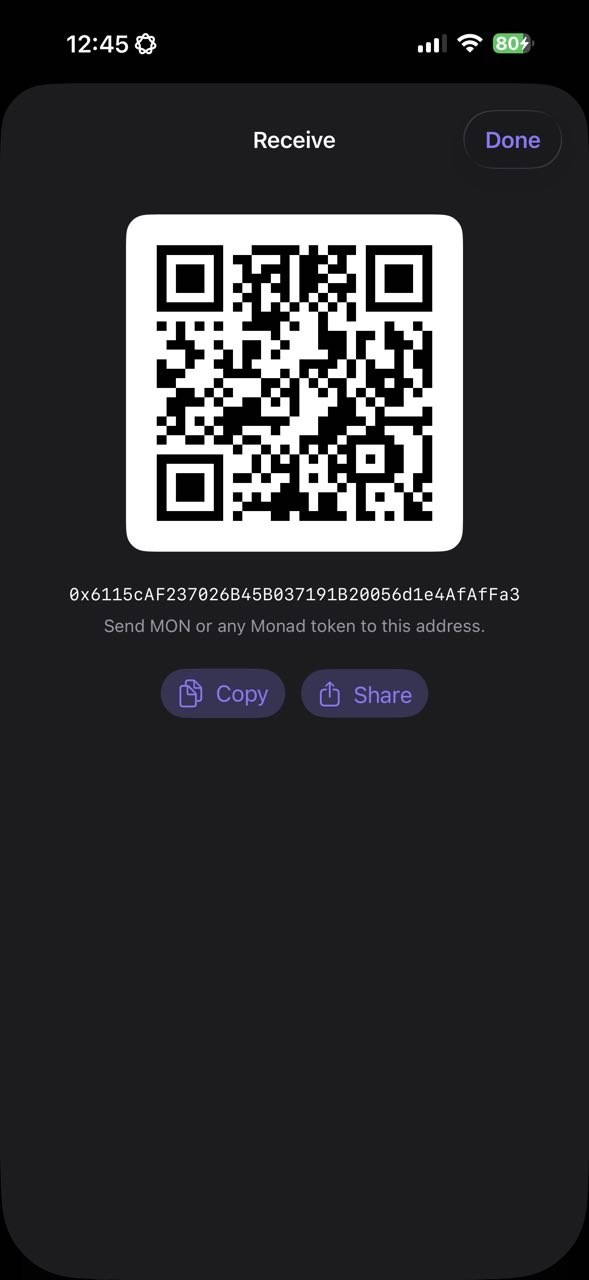
1. On **Home**, tap **Deposit**. (Also: Profile → **Receive**.)
2. The Receive sheet shows a QR code and your full address.
3. Tap **Copy** or **Share**, or let the sender scan the QR.
Send **only Monad-network assets** to this address. Sending from another chain without a bridge will not arrive.
## Ways to get funds onto Monad
* **From an exchange:** withdraw MON (or USDC) to your DyorHQ address on the Monad network, if your exchange supports Monad withdrawals.
* **From another wallet on Monad:** send to your address as usual.
* **From another chain:** tap **Bridge** on Home. DyorHQ's built-in bridge (powered by Aurora Intents) moves USDC and other assets from Ethereum, Base, Arbitrum, Optimism, Polygon, BNB Chain, Avalanche, Gnosis, Scroll or Berachain straight into your Monad wallet. See [Bridge](/docs/wallet-and-account/bridge.md).
## Check your balance
Your **Home** hero card shows total value, **Avail. Balance** (spot) and **In Use** (perps). The **My Holdings** card lists every token you hold with its value and 24h change. Home refreshes every 30 seconds and on pull-to-refresh.
## Running low on gas
If a transaction fails with **"Not enough MON to pay for gas."**, top up MON. Everything else can wait; gas can't.
---
# Agent Instructions
This documentation is published with GitBook. GitBook is the documentation platform designed so that both humans and AI agents can read, navigate, and reason over technical content effectively. Learn more at gitbook.com.
## Querying This Documentation
If you need additional information that is not directly available in this page, you can query the documentation by asking a question.
Perform an HTTP GET request on the following URL with the `ask` and `goal` query parameters:
```
GET https://dyorhq.gitbook.io/docs/getting-started/fund-your-wallet.md?ask=&goal=
```
`ask` is the immediate question: it should be specific, self-contained, and written in natural language.
`goal` is what the user is ultimately trying to achieve, the reason they need the answer. Sharing it helps GitBook give you a better, more relevant answer. A goal is most helpful when it describes the outcome the user wants rather than restating the question. For example, with `ask=how do I create an API token`, a goal like `automate deployments from our CI pipeline` lets GitBook tailor the answer to that use case.
The response will contain a direct answer to the question and relevant excerpts and sources from the documentation.
Use this mechanism when the answer is not explicitly present in the current page, you need clarification or additional context, or you want to retrieve related documentation sections.