> For the complete documentation index, see [llms.txt](https://dyorhq.gitbook.io/docs/llms.txt). Markdown versions of documentation pages are available by appending `.md` to page URLs; this page is available as [Markdown](https://dyorhq.gitbook.io/docs/launchpad/overview.md).
# Overview
The DyorHQ Launchpad is a fair-launch bonding curve on Monad. Anyone can launch a coin, anyone can trade it on the curve, and when the curve raises its target the liquidity moves into a pool that is **locked forever**. The twist: a coin can be paired with **MON, USDC, AUSD or aBIL**, a tokenized T-bill stock, which is what "launching a memecoin paired with a tokenized RWA" means in practice.
**Where:** the **Launch** tab.
## How it works
1. **Launch.** A creator sets a name, ticker, image, description, links, the pair asset, the graduation venue, an optional developer buy, an optional creator tax and whether fees are shared with holders. The whole **1,000,000,000** supply mints straight to the bonding curve. There is no team allocation. Launching costs a **5 MON** fee.
2. **Curve trading.** Anyone buys and sells on the curve. Price rises as the curve fills. A **1%** trade fee, the creator tax (if any) and a steep, fast-decaying **early-buy tax** in the first four seconds are taken on every trade.
3. **Graduation.** The buy that pushes the raised amount to the pair asset's threshold completes the curve. In the same transaction the raised funds and the coins the final price implies are seeded into a **Uniswap v4** or **Monday Trade** pool at the curve's final price, and the position is locked in a contract with no withdrawal function. The rest of the withheld supply (10% of the total) stays in the locker, unpaired, forever.
4. **Pool trading.** From then on the coin trades in Swap like any other token. On Uniswap v4, the pool fee and creator tax keep flowing to DyorHQ and to the creator or holders; on Monday Trade, the pool's 1% fee is harvested by DyorHQ and isn't shared with the creator or holders.
## The numbers
| Parameter | Value |
| --------------------------------------- | ------------------------------------------------------------------------------------------------------------------------------------------------------------------------- |
| Supply per coin | 1,000,000,000 (fixed, no minting after launch) |
| Launch fee | 5 MON |
| Curve trade fee | 1% (buys: off the input; sells: off the output) |
| Creator tax | 0% to 10%, chosen at launch in 0.25% steps |
| Early-buy tax | 98% (less the creator tax) → 25% → 3% → 0.3% in seconds 0–3 after launch, then 0 |
| Fee split | 50% DyorHQ / 50% creator (or holders) |
| Withheld from the curve | About 31.6% of supply (about 68.4% is sold on the curve). At graduation about 21.6% goes into the pool; the remaining 10% (100M coins) is locked, unpaired, in the locker |
| Launch valuation → graduation valuation | 10× (a coin launches at about a $2,000 FDV and graduates at about $20,000) |
| Slippage on curve trades | 1% minimum-received floor |
### Graduation thresholds by pair asset
| Pair asset | Raised on the curve to graduate | Graduates on |
| ---------- | -------------------------------------------------------------------- | ---------------------------------------------------- |
| MON | $4,324.56 worth of MON at the price when the launchpad was deployed | Uniswap v4 (default) or Monday Trade (as TOKEN/WMON) |
| USDC | 4,324.56 USDC | Uniswap v4 (default) or Monday Trade |
| AUSD | 4,324.56 AUSD | Uniswap v4 (default) or Monday Trade |
| aBIL | $4,324.56 worth of aBIL at the price when the launchpad was deployed | Monday Trade only |
The USDC and AUSD thresholds are exactly $2,000 × (√10 − 1). The MON and aBIL thresholds were fixed at deployment from the prices at the time, so their dollar value moves with those assets. The app always shows the live threshold for the pair you pick ("Graduates at X \ raised").
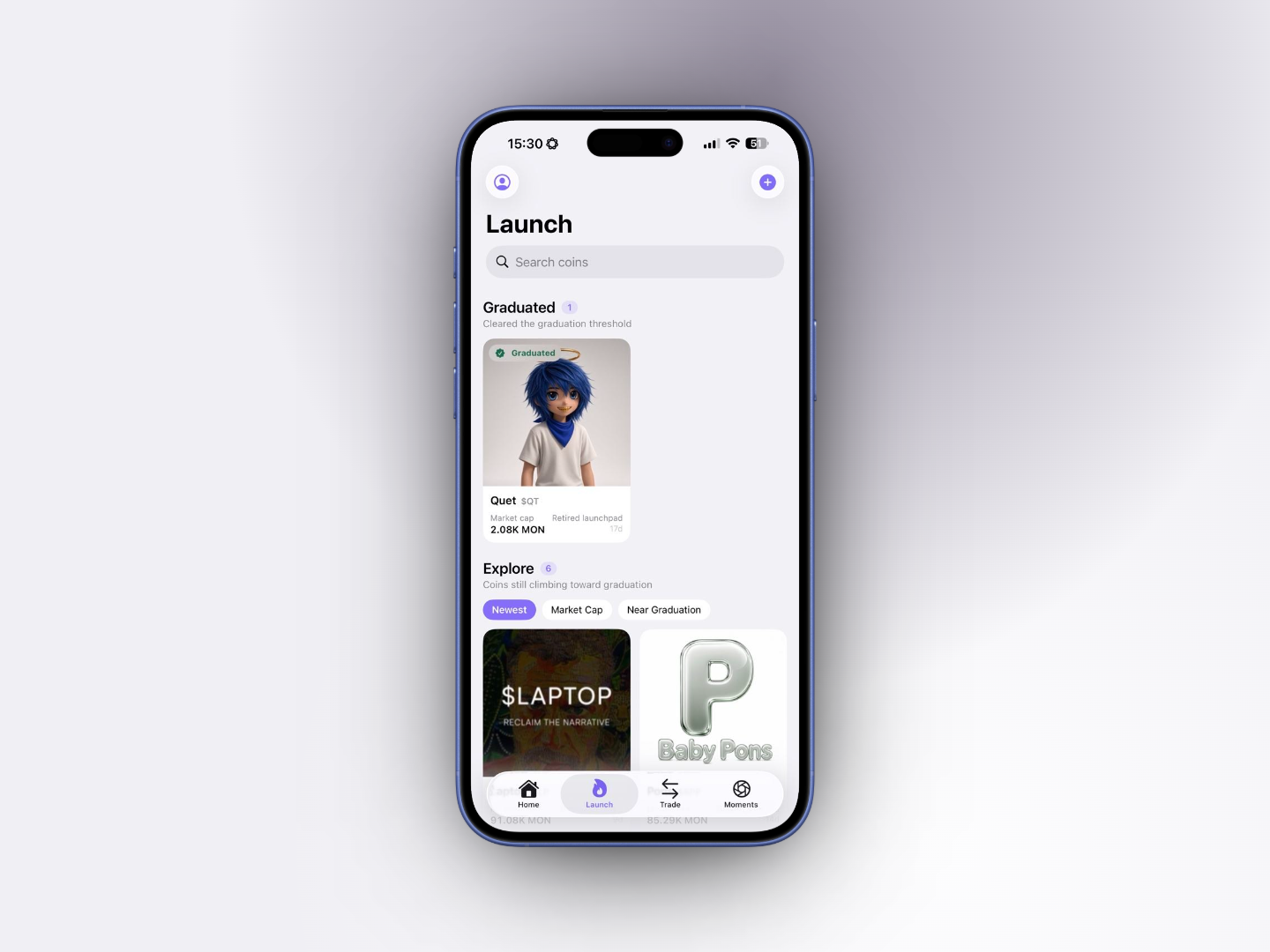
## Explore screen
* **Graduated**: coins that cleared the threshold, newest first, with a **Graduated** badge.
* **Explore**: coins still on the curve, sortable by **Newest**, **Market Cap** or **Near Graduation**. Cards at 80%+ show their percentage badge.
* **Refund & Migrating**: coins in refund mode (holders sell back into the curve) or migrating (nothing trades until they graduate), newest first. Shown only when there are any.
* Coins from a previous DyorHQ launchpad are listed too, marked **Retired launchpad** (see below).
* Each card: image, name, $TICKER, market cap in the pair asset, age, and a "N% to graduation" progress bar.
* **Search coins** by name or symbol. The list polls every 20 seconds.
* Toolbar: **My Launchpad** (your holdings, launches, claims) and **New Launch**.
## Lifecycle states
| State | What it means |
| ---------------------- | ---------------------------------------------------------------------------------------------------------------------------------------------------------------------------------------------------- |
| **Bonding** | Trading on the curve. |
| **Graduation pending** | The curve is full but its graduation hasn't gone through yet. Nothing trades until it does; anyone can tap **Retry Graduation** on the coin's page. See [Graduation](/docs/launchpad/graduation.md). |
| **Migrating** | Between the curve and the pool. Normally this happens inside the graduating transaction and you won't see it; if you do, nothing trades until the coin graduates. |
| **Graduated** | Pool is live and locked; trade via Swap. |
| **Refund mode** | The graduation stayed stuck for 7 days, so DyorHQ reopened the curve for fee-free sells back to it; nothing can be bought. The coin's page offers **Sell** only, at the curve's price. |
## Coins from previous launchpads
Coins launched on a previous DyorHQ launchpad keep their pages, charts and history, marked **Retired launchpad**. The app launches new coins on the current launchpad only (see [Contracts & Addresses](/docs/resources/contracts-and-addresses.md)), but the previous launchpad contracts stay on chain: a coin launched there, for example from an older app version, is marked **Retired launchpad** too and is sell-only in the app.
* A coin still on its curve can be **sold but not bought**: its page offers **Sell on the Curve** only, with *"This coin's launchpad is retired: you can sell, but not buy."* Swap doesn't quote a buy of it either.
* A coin that already graduated trades both ways on Swap, like any other pool token.
* Creator fees and holder rewards stay claimable from the coin's page and **My Launchpad**.
## What the owner can and cannot do
DyorHQ cannot withdraw locked liquidity, touch a curve's reserves, change a live launch's fees, mint tokens or pause trading. The one exception: if a graduation stays stuck for 7 days, DyorHQ can put the curve into refund mode, where holders sell back to it with no fees.
The owner of the current launchpad is a DyorHQ Safe multisig that needs two of its three signers for every action (address in [Contracts & Addresses](/docs/resources/contracts-and-addresses.md)).
Next: [Launch a Coin](/docs/launchpad/launch-a-coin.md), [Trading on the Curve](/docs/launchpad/trading-on-the-curve.md), [Graduation](/docs/launchpad/graduation.md), [Creator Fees & Holder Rewards](/docs/launchpad/fees-and-rewards.md).
---
# Agent Instructions
This documentation is published with GitBook. GitBook is the documentation platform designed so that both humans and AI agents can read, navigate, and reason over technical content effectively. Learn more at gitbook.com.
## Querying This Documentation
If you need additional information that is not directly available in this page, you can query the documentation by asking a question.
Perform an HTTP GET request on the following URL with the `ask` and `goal` query parameters:
```
GET https://dyorhq.gitbook.io/docs/launchpad/overview.md?ask=&goal=
```
`ask` is the immediate question: it should be specific, self-contained, and written in natural language.
`goal` is what the user is ultimately trying to achieve, the reason they need the answer. Sharing it helps GitBook give you a better, more relevant answer. A goal is most helpful when it describes the outcome the user wants rather than restating the question. For example, with `ask=how do I create an API token`, a goal like `automate deployments from our CI pipeline` lets GitBook tailor the answer to that use case.
The response will contain a direct answer to the question and relevant excerpts and sources from the documentation.
Use this mechanism when the answer is not explicitly present in the current page, you need clarification or additional context, or you want to retrieve related documentation sections.