> For the complete documentation index, see [llms.txt](https://dyorhq.gitbook.io/docs/llms.txt). Markdown versions of documentation pages are available by appending `.md` to page URLs; this page is available as [Markdown](https://dyorhq.gitbook.io/docs/platform/app-tour.md).
# App Tour
A map of every screen in DyorHQ so you always know where you are.
## The tab bar
| Tab | What's there |
| -------------- | ---------------------------------------------------------------------------------------------------------------- |
| 🏠 **Home** | Total value, quick actions (Bridge, Deposit, Withdraw, Transfer), Portfolio allocation, Top Tokens, My Holdings. |
| 🔥 **Launch** | The Launchpad: graduated coins, coins still on the curve, search, **New Launch** and **My Launchpad**. |
| 🔁 **Trade** | Two modes under one tab, switched at the top: **Swap** (spot) and **Perps** (Perpl). |
| 📸 **Moments** | The Moments feed (All / Collecting / Graduated), **Publish** and **My Moments**. |
Trade sits between Launch and Moments on purpose: it divides the two "coin" sections.
## The Home header
From left to right:
* **☰ Menu**: opens the side menu (below).
* **Search tokens…**: jumps to any token's detail page (price, 24h chart, your balance, Swap button).
* **Refresh status**: a small relative time since the last refresh (for example "2 min"), or a warning icon if the last refresh failed.
* **🔔 Notifications**: the in-app notification center, with an unread badge.
* **Avatar**: opens your Profile. Watch-only sessions show an eye icon instead.
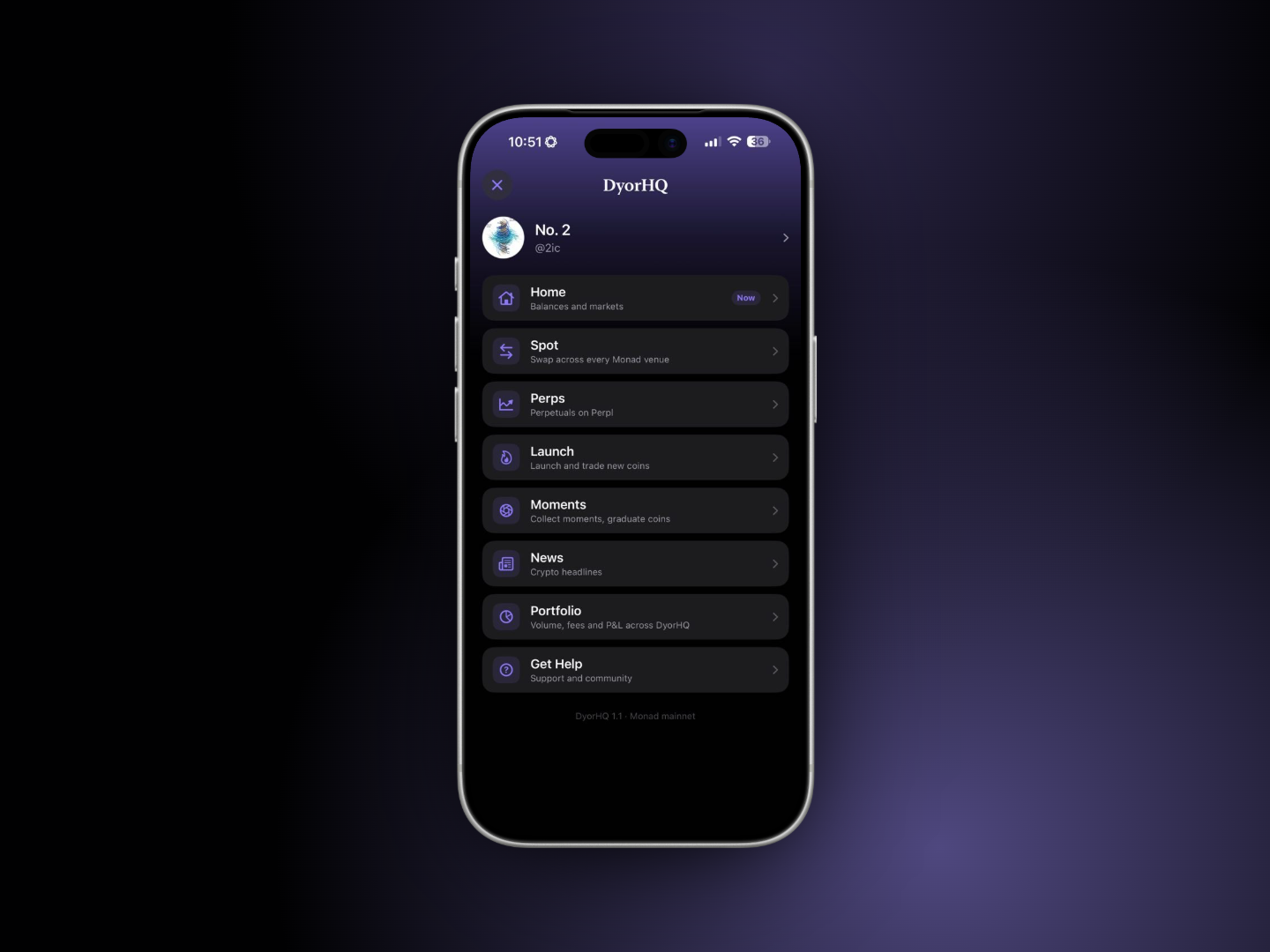
## The side menu (☰)
| Item | Subtitle in the app | Opens |
| --------- | ----------------------------------- | --------------------- |
| Home | Balances and markets | Home tab |
| Spot | Swap across every Monad venue | Trade tab, Swap mode |
| Perps | Perpetuals on Perpl | Trade tab, Perps mode |
| Launch | Launch and trade new coins | Launch tab |
| Moments | Collect moments, graduate coins | Moments tab |
| News | Crypto headlines | Full-screen News |
| Portfolio | Volume, fees and P\&L across DyorHQ | Full-screen Portfolio |
| Get Help | Support and community | Full-screen Support |
The profile row at the top opens **Profile**. The footer shows the app version and "Monad mainnet".
## Screens outside the tabs
* **Profile**: wallet actions (Receive, Send, Recent Activity), every setting, network info, Sign Out and Delete Account. See [Profile & Settings](/docs/wallet-and-account/profile-and-settings.md).
* **Portfolio**: cumulative volume, fees, P\&L and trade counts by product and period, holdings (Assets / NFTs) and full activity. See [Home & Portfolio](/docs/wallet-and-account/home-and-portfolio.md).
* **News**: headlines from CoinDesk, Cointelegraph, Decrypt, The Defiant and The Block, filterable by source, opened in an in-app browser.
* **Notifications**: everything the app has told you, grouped by day, filterable by kind.
* **Get Help**: the Help Center (these docs), Getting Started, Risk Disclosures and Contracts & Addresses, email support, bug report, X, website, Terms of Use and Privacy Policy. See [Official Links & Support](/docs/resources/official-links.md).
## Conventions you'll see everywhere
* **Every wallet transaction goes through a confirmation sheet** that lists exactly what will be sent (amounts, venue, route, minimums) and then shows each step as it's sent and confirmed, with a **View** link to Monadscan. The exceptions are the bridge (its summary is the review), One-Click perp orders (signed by your Perpl trading key), and the one-time **Enable One-Click Trading** transaction (Profile → Perpl Trading). With Require Face ID on, each of them still asks for Face ID.
* **Gains and losses always carry a sign or a word**, never colour alone. Green means Long / Up, red means Short / Down (legend under Profile → Appearance).
* **Amounts use tabular figures** so columns line up.
* **Pull to refresh** works on Home, Portfolio, Recent Activity and the Perps Portfolio. Swap and Perps refresh themselves (quotes every 15 seconds, Perpl every 8 seconds); Home also refreshes itself every 30 seconds.
* **Watch-only** sessions can read everything, but every action ends in a "Sign in to trade" message, either on the button or in the confirmation sheet.
---
# Agent Instructions
This documentation is published with GitBook. GitBook is the documentation platform designed so that both humans and AI agents can read, navigate, and reason over technical content effectively. Learn more at gitbook.com.
## Querying This Documentation
If you need additional information that is not directly available in this page, you can query the documentation by asking a question.
Perform an HTTP GET request on the following URL with the `ask` and `goal` query parameters:
```
GET https://dyorhq.gitbook.io/docs/platform/app-tour.md?ask=&goal=
```
`ask` is the immediate question: it should be specific, self-contained, and written in natural language.
`goal` is what the user is ultimately trying to achieve, the reason they need the answer. Sharing it helps GitBook give you a better, more relevant answer. A goal is most helpful when it describes the outcome the user wants rather than restating the question. For example, with `ask=how do I create an API token`, a goal like `automate deployments from our CI pipeline` lets GitBook tailor the answer to that use case.
The response will contain a direct answer to the question and relevant excerpts and sources from the documentation.
Use this mechanism when the answer is not explicitly present in the current page, you need clarification or additional context, or you want to retrieve related documentation sections.