> For the complete documentation index, see [llms.txt](https://dyorhq.gitbook.io/docs/llms.txt). Markdown versions of documentation pages are available by appending `.md` to page URLs; this page is available as [Markdown](https://dyorhq.gitbook.io/docs/spot-trading/swap.md).
# Swap
Swap Monad tokens from your own wallet. DyorHQ quotes **Kuru Flow**, **Uniswap** (v3 and v4) and **Monday Trade** at the same time, ranks them by what you receive, and executes the one you pick through that venue's own router. DyorHQ adds no fee of its own to a swap, and for ordinary pairs no DyorHQ contract sits in the path. Graduated Launchpad coins and Moment coins are different: they trade in the pools set up when they graduated (on Uniswap v4 through DyorHQ's pool hooks, or on Monday Trade), and part of those pools' trading fee goes to DyorHQ. See [Creator Fees & Holder Rewards](/docs/launchpad/fees-and-rewards.md) and [Earnings, Fees & Buybacks](/docs/moments/earnings-and-fees.md).
**Where:** Trade tab → **Swap**. Also reachable from the side menu ("Spot"), from a token's detail page (**Swap QT**), and from graduated Launchpad and Moment coins (**Swap QT on …** / **Trade $QT**).
## The screen
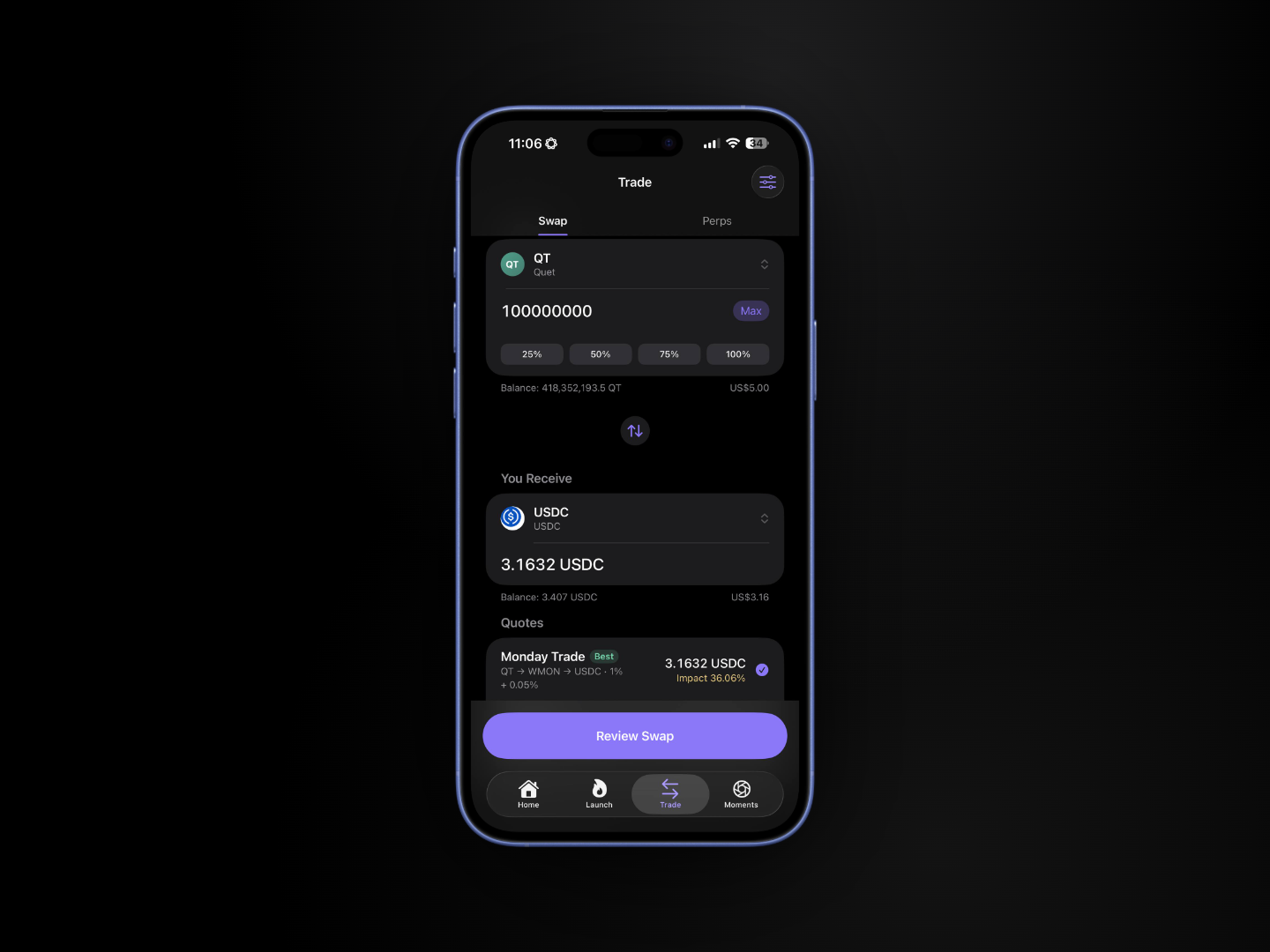
* **You Pay**: token picker, amount field, your balance and its USD value, and 25% / 50% / 75% / 100% buttons. Tapping 100% on MON keeps back enough MON to pay the swap's network fee. The app estimates it from the route on screen at the current gas price, and keeps 0.06 MON if the fee can't be read.
* **⇅** flips the pair.
* **You Receive**: token picker and the quoted amount ("Finding the best price" while quoting).
* **Quotes**: one row per venue with the output amount, the route and price impact; venues that couldn't quote get their own row with the reason. The best output is tagged **Best** and preselected; tap another row to choose it instead.
* **Slippage** (the slider icon, top right) opens the slippage sheet; the current tolerance shows in the "Minimum received … at X% slippage" line under the quotes.
* **Swap History** (signed-in wallets): your swaps over 24H / 7D / 30D / All, with Monadscan links.
* The primary button reads **Enter an Amount**, **Insufficient QT**, **Wrap MON**, **Unwrap WMON** or **Review Swap** depending on state.
## How to swap
1. Choose the token you pay and enter an amount.
2. Choose the token you receive.
3. Quotes arrive within a second or two. Each venue has up to 20 seconds; a slow venue never hides the others. Quotes refresh every 15 seconds while an amount is entered.
4. Keep the **Best** quote or tap another venue.
5. Tap **Review Swap**. The sheet lists **You pay**, **You receive**, **Minimum received**, **Venue**, **Route** and **Slippage**.
6. Tap **Swap**. If **Require Face ID** is on, confirm with Face ID.
7. Each step is simulated, sent and confirmed in order. Approvals are for the exact amount and the swap uses them up, so an ERC-20 swap usually shows its approval step each time. A step is skipped only when an existing allowance already covers the amount. Tap **View** on any step to see it on Monadscan.
You get a "Swap complete" notification, and the swap appears in Swap History, Recent Activity and Portfolio.
## The venues
| Venue | Route text you'll see | Approval steps |
| ---------------- | ---------------------------------------------------------- | ---------------------------------------------------------------------------------------------------------------------------------------------------- |
| **Kuru Flow** | "Aggregated across Kuru order books and Monad pools" | Approve QT for Kuru Flow (exact amount) → Swap on Kuru Flow |
| **Uniswap v3** | "v3 · MON → USDC · 0.05%" | Approve QT for Uniswap (exact amount) → Swap on Uniswap v3 |
| **Uniswap v4** | "v4 · MON → USDC · 0.05%", "+ launchpad", "moments 1.5%" | Approve QT for Permit2 (exact amount) → Allow the Universal Router to spend QT (Permit2, exact amount, expires after 2 minutes) → Swap on Uniswap v4 |
| **Monday Trade** | "MON → USDC · 0.05%" or "USDC → WETH → MON · 0.05% + 0.3%" | Approve QT for Monday Trade (exact amount) → Swap on Monday Trade |
| **Wrap** | "Wrap MON → WMON, 1:1" / "Unwrap WMON → MON, 1:1" | None |
Native MON never needs an approval. Uniswap and Monday routes are searched directly at the deepest fee tiers and through one hop via WMON, USDC, USDT0 or WETH. Uniswap offers the better of its v3 and v4 routes as one quote. Launchpad coins that graduated to Uniswap v4, and graduated coins from the current Moments release, are reached through Uniswap v4; coins that graduated to Monday Trade are quoted by the Monday Trade venue. Moment coins from an earlier Moments release (a past cohort) can't be traded in the app: the token picker hides them, and a pasted address shows "Past cohort · trading closed".
Launchpad coins that are **still on their bonding curve** aren't routed by any venue: they trade on their Launch page. If no venue can route your pair and one side is such a coin, Swap says so under the button and offers **Trade TICKER on its Launch page** (or **Sell TICKER on its Launch page**, or **Find TICKER on the Launch tab** if its launch can't be read just now). If that check fails, it offers **Check Again** and **Open the Launch Tab**. A coin still on the curve of a previous DyorHQ launchpad can be sold but not bought, so Swap never quotes a buy of it (see [Trading on the Curve](/docs/launchpad/trading-on-the-curve.md)).
Swap transactions carry a 10-minute deadline. Kuru Flow quotes are tied to your wallet address and refreshed automatically (Kuru allows one quote per second per address).
## Errors you might see
| Message | Meaning |
| -------------------------------------------------------------------------------------------------------- | ------------------------------------------------------------------------------------------------------------- |
| No venue can route this pair right now. | None of the three venues found liquidity for this pair. |
| No route for this pair. | That one venue has no pool for the pair. |
| \ did not answer within 20s. | Venue timed out; others still show. |
| Kuru Flow rate limit reached. Retrying on the next refresh. | Kuru's 1 request/second limit; wait for the next refresh. |
| Insufficient QT | Amount exceeds your balance. |
| Not enough MON to pay for gas. | Top up MON. |
| Past cohort · trading closed. \ is a retired Moment coin, so DyorHQ never trades it. | The coin is from an earlier Moments release. Holders can still claim their vested coins on the Moment's page. |
| This coin's launchpad is retired: you can sell, but not buy. | You tried to buy a coin still on a previous launchpad's curve. Holders can sell it on its Launch page. |
| DyorHQ couldn't check this coin's launchpad just now, so buying it isn't offered. Try again in a moment. | DyorHQ couldn't confirm the coin you're buying isn't on a previous launchpad's curve, so no venue was asked. |
Next: [Slippage & Price Impact](/docs/spot-trading/slippage-and-price-impact.md) and [Adding Any Monad Token](/docs/spot-trading/adding-tokens.md).
---
# Agent Instructions
This documentation is published with GitBook. GitBook is the documentation platform designed so that both humans and AI agents can read, navigate, and reason over technical content effectively. Learn more at gitbook.com.
## Querying This Documentation
If you need additional information that is not directly available in this page, you can query the documentation by asking a question.
Perform an HTTP GET request on the following URL with the `ask` and `goal` query parameters:
```
GET https://dyorhq.gitbook.io/docs/spot-trading/swap.md?ask=&goal=
```
`ask` is the immediate question: it should be specific, self-contained, and written in natural language.
`goal` is what the user is ultimately trying to achieve, the reason they need the answer. Sharing it helps GitBook give you a better, more relevant answer. A goal is most helpful when it describes the outcome the user wants rather than restating the question. For example, with `ask=how do I create an API token`, a goal like `automate deployments from our CI pipeline` lets GitBook tailor the answer to that use case.
The response will contain a direct answer to the question and relevant excerpts and sources from the documentation.
Use this mechanism when the answer is not explicitly present in the current page, you need clarification or additional context, or you want to retrieve related documentation sections.